Every shop has a place where problems land. Art came in low-res. The PMS doesn’t match. The proof went out with the wrong ink color. Maybe someone posts it. Someone fixes it. The message scrolls up and nobody counts. But the history is still there. °FAI: Your Art Channel Already Knows What’s Broken.
Here’s how to build a bot that reads a Slack channel and turns it into a dashboard. (if you use Slack)
First, make the bot.
A Slack bot is an app. You create one at api.slack.com/apps. Click Create New App. Choose From scratch. Name it and pick your workspace.
Next, give it permission to read. Slack calls these scopes. Add channels:history to read public channels. Then add groups:history if the art channel is private. Add channels:read so it can find the channel.
Then click Install to Workspace. Slack gives you a Bot User OAuth Token. It starts with xoxb-. Treat it like a password.
Then, invite it in.
A bot can’t read a channel it hasn’t joined. Slack’s docs say a bot token reaches only the conversations the bot is a member of. So go to the art channel and type /invite @yourbot.
That works in your favor. The bot sees the channels you let it see. Nothing else.
Pull the history.
The bot reads messages with a method called conversations.history. Call it with no start or end date and it reads the whole channel, one page at a time.
You don’t have to write this part yourself. Describe it to an AI. “Use my bot token. Pull every message from #art. Save each one with the date, the author, and the text.” Have it save to a file.
Sort the problems. Then count them.
Raw messages aren’t a report. So the next step is sorting. Hand the messages to an AI with a short list of categories. Low-res art. Wrong PMS. Missing proof. Separation issue. Ask it to tag each message, and to leave it untagged if it isn’t sure.
Then a person checks the tags. The AI proposes. Someone who knows the art department decides.
From there, the dashboard is one HTML page. Problems per week. Top categories. The ones that keep coming back. It’s the same approach as the dashboard that caught my runaway API bills. Collect the data. Count it. Put it where you can see it.
The honest part
Slack changed its rules in 2025. Apps sold to other workspaces outside the Slack Marketplace now get one history request per minute, 15 messages at a time. A custom app built for your own workspace is treated differently. Slack lists those at 50+ requests per minute. Build it for your shop, not for resale.
And reading your channel with an AI means sending shop messages to a third party. That’s an owner’s call. I wrote about why in °FAI: AI Adoption Is a Leadership Decision. This is also one of the two things AI is good at, and it’s how you scale the expertise already in the room.
Tools used:
- Slack (the art channel, and the bot that reads it)
- Slack Web API (
conversations.history, the method that pulls the messages) - Claude (writes the pull script, tags the messages, first drafted this article)
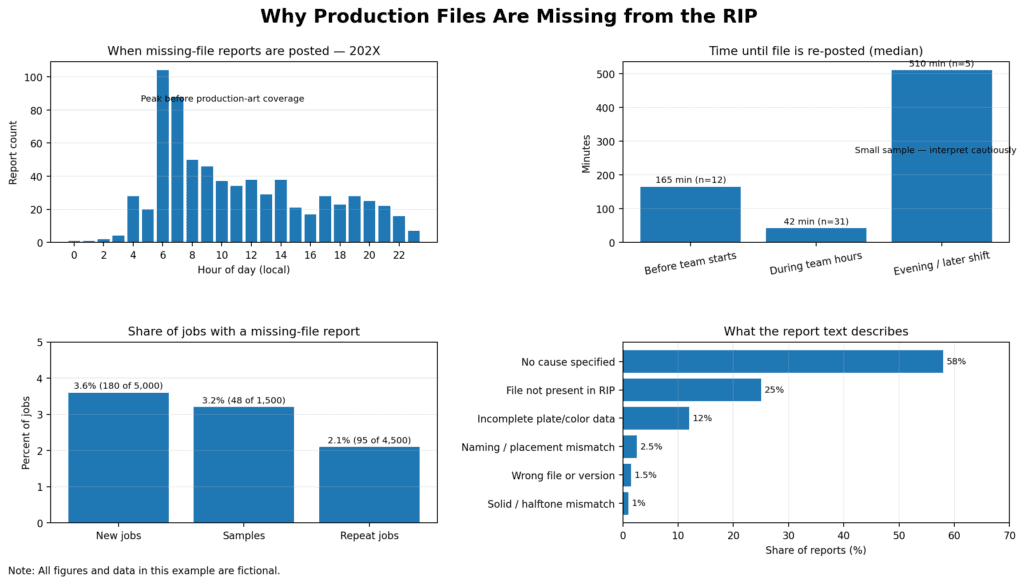
This example shows what time things are fixed, what the specific problems are, and whether or not it’s on new orders, samples, or reorders. You can run any kind of report that you can extract. You can even ask the AI what to run.


Comments